

What an AI interview tool is, and the four kinds you will be sold
Search for an AI interview tool and you get four different products under one name. They sit at different points of the process, they touch different people, and they carry different risks. Treating them as one category is how a team ends up buying a screening robot when what it needed was a note-taker.
- Interview intelligence. The tool joins a live interview on a video call, records it, writes a transcript and drafts notes or a summary. The interviewer still asks the questions. The assistance happens afterwards.
- Interviewer guidance. The tool helps before and during the interview: questions drawn from the job description, a structure to follow, a check that the same topics were covered in every conversation.
- One-way video interviews. The candidate records answers to set questions in their own time, and the team watches later. Some vendors now add automatic transcripts, summaries or scoring on top.
- AI-led screening interviews. A voice or chat agent puts the questions to the candidate, asks follow-ups and hands over a score or ranked summary. No human is in the conversation.
The first two assist a person who is still doing the interview. The last two replace the first conversation. That difference decides almost everything else in this guide: the legal position, the candidate experience, who has to be convinced internally, and what you should ask the vendor.
The guide is for talent acquisition teams that already run a structured process and want to know where assistance helps and where it adds a risk. We make an applicant tracking system, so Teamtailor is listed first in the tool chapter and we say plainly that it is our own product. The other ten tools are described from their own websites as read on 29 October 2026, and we have kept to what each vendor states about itself.
The same four kinds cover every round, from phone screen to final interview. If your first problem is the quality of the questions rather than the tooling, start with structured interviews and the phone screening article, then come back.
How to use AI for interviews without handing the judgement over
An interview has five jobs: preparing, asking, listening, recording and deciding. The tools are good at two of them and should be kept away from the last.
Preparing
A hiring manager who has not interviewed for a year opens the job ad ten minutes before the call and asks about whatever is in the first line. A drafted set of questions, built from the role description and then edited by a person, beats that. The draft is only a start. The recruiter strikes the generic question, adds the one about the team's actual backlog, and sets the scorecard before anyone is interviewed.
Recording and writing up
This is where the time goes and where the tools are most dependable. A recruiter who has done five interviews in a day writes up the fifth from memory, and the fifth is the one that reads like the first. A transcript and a draft summary fix the part of the notes that is mechanical. They do not fix the part that matters, which is what the interviewer made of the answer.
Deciding
Scores, rankings and "match" percentages sit here, and this is where the tools ask for most trust and explain least. Several of the vendor pages we read describe scores without saying what they are validated against. That is not proof of a problem, but it is the gap to close in a pilot, before any score reaches a shortlist.
A rule of thumb that should hold for every tool in this guide: the assistance may produce a draft, a transcript or a suggestion, and a named person decides. If a vendor cannot show you the point where the person decides, you have found the thing to ask about.
Eight questions to ask before you buy
The same questions work for a note-taker and for a screening agent, and the answers differ in useful ways.
- Where in the process does it act? Name the stage. If the answer is "throughout", ask which parts a candidate would notice.
- Who sees the output, and who can edit it? A summary nobody can correct will be quoted as fact by the third interviewer.
- What happens to the recording? Ask for the retention period and how to delete a recording and its transcript for one candidate.
- How is the candidate told? The notice should be in the invitation or on screen before the interview starts, not in a policy page.
- Which languages does it handle, in speech and in output? Transcript language and summary language are often not the same.
- What is scored, against what, and who validated it? If nothing is scored, say so in your notes, because that is a lower-risk product.
- Does it connect to your applicant tracking system, and which way does data flow? A tool that makes a team copy notes across by hand has moved the admin, not removed it.
- Which security evidence can you read? Ask for the certificate, its scope and the date of the last audit.
The fourth question has an extra edge for one-way video and AI-led interviews. A candidate who talks to a screen with no person behind it is having a different experience from one who talks to a recruiter, and in some roles that is fine and in others it loses you the person you wanted. Decide that on purpose. The video interview glossary entry covers the live and recorded formats, and the screening entry covers the stage before.
On the 80/20 rule
The 80/20 rule is a saying, not a standard: the candidate speaks for about 80 per cent of the time and the interviewer for the remaining 20.[S9] It is a useful target when you read a transcript: count who is talking. An interviewer who sits at 60 per cent is often answering their own questions. Use it as a prompt for coaching, not as a score on the interviewer.
Rules and regulators: what changes when a tool assesses people
Assistance that writes notes and assistance that ranks people are treated differently, and you should know which one you are buying.
Under the EU AI Act, AI systems intended for the recruitment or selection of people are listed as high-risk. The list names systems used to analyse and filter job applications and to evaluate candidates, as well as systems used to make decisions about the terms of work-related relationships.[S7] A scoring agent in a screening interview falls into that description. A plain transcript of an interview a person conducted is a different question, and your legal team should read the text rather than rely on a summary from either of us.
In the UK, the Information Commissioner's Office published the outcome of its audits of AI recruitment tools on 6 November 2024. It made almost 300 recommendations to the providers audited, and all were accepted or partially accepted.[S8] The findings are useful as a buyer's checklist. Some tools let recruiters filter out candidates with certain protected characteristics, some guessed gender and ethnicity from names rather than asking, and some collected far more personal information than necessary and kept it indefinitely to build large candidate databases.[S8] The ICO also published key questions for organisations that buy such tools, and they are worth putting into your vendor review.[S8]
Three practical consequences follow for a team of the size this guide is written for.
- Keep a record of which tool touches which stage, and who in your organisation approved it.
- Give candidates a plain notice and a way to ask for a person instead, where the tool makes or shapes a decision.
- Ask the vendor for the retention setting and set it, rather than accepting the default. See hiring bias and removing bias from the recruitment process for the process side.
Teamtailor: interviews inside the applicant tracking system
Teamtailor is our own product, so read this section as the description of one option from the company that makes it. The disclosure matters here for a reason beyond courtesy: the main difference between Teamtailor and most of the tools below is that the interview is not a separate product. It is a step in the same place where the job, the candidate and the decision already live.
In Teamtailor, a recruiter sets up a video meeting and picks a video service. The built-in video service is always available, and an external service can be connected instead.[S1] Participants enter through a waiting room, and a Teamtailor user admits the candidate and any other external participants.[S1] A chat transcript from the meeting is saved to the candidate card.[S1]
Recording, transcripts and summaries
Recording is an add-on that a Company Admin turns on. In the built-in video service the candidate gets a prompt asking whether they consent to being recorded. For Zoom, Google Meet or Microsoft Teams, a recording bot joins when the meeting starts, and the candidate is told in the invitation email.[S2] A candidate who does not want to be recorded has to ask for recording to be turned off before the meeting, and that is a limit worth knowing about when you set your own process.[S2] Physical meetings can be audio-recorded in the mobile app.[S2]
A recorded meeting gets a transcript in the language spoken, plus a short summary of at most 200 words, a longer summary and a questions-and-answers section, written in the company's default language. Summaries can be edited. Video recordings are deleted automatically after 30 days unless saving is enabled, and transcripts and summaries stay after that. A recording or transcript can be deleted by hand from the candidate card.[S3]
Interview kits and the draft answers
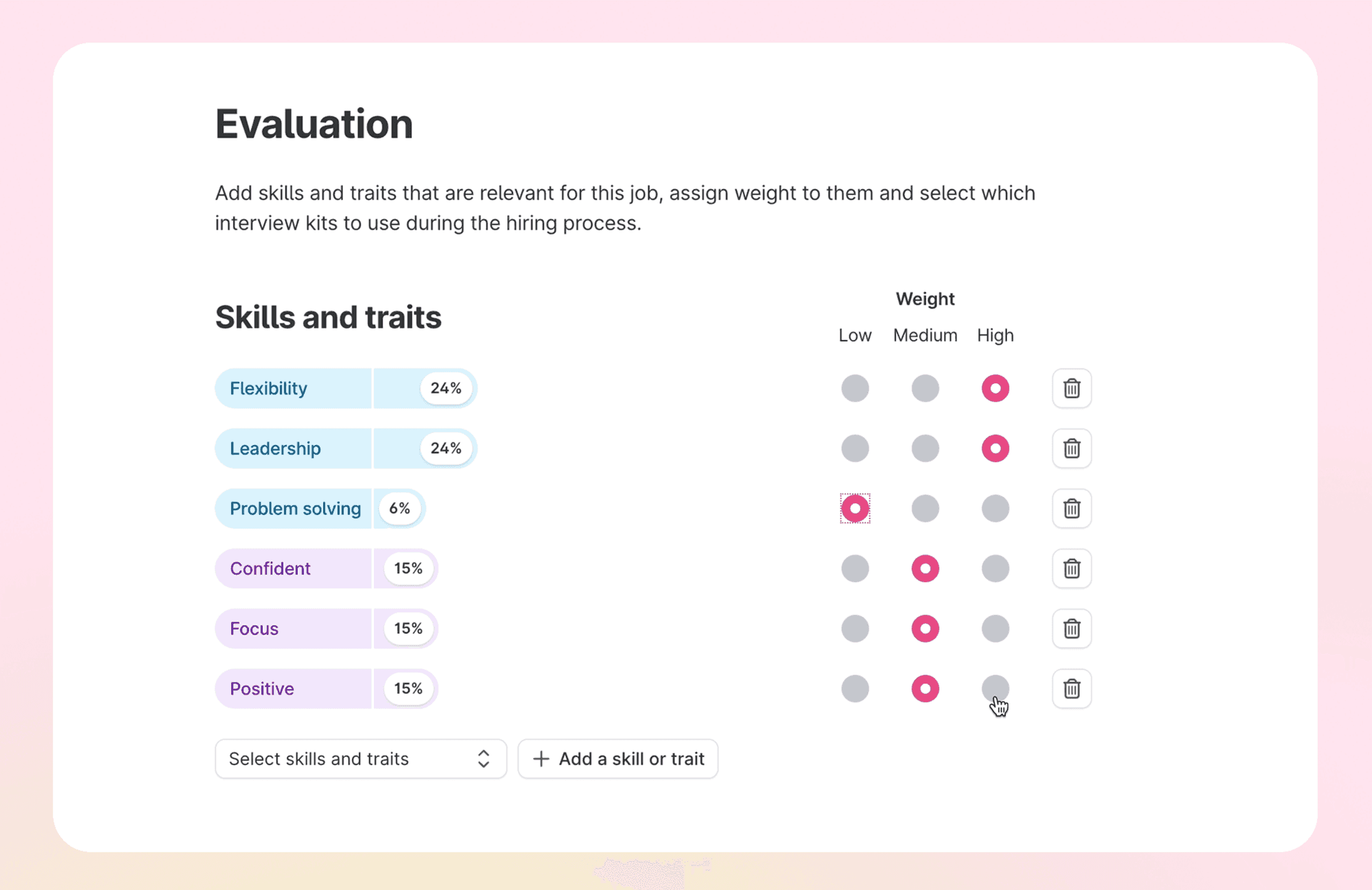
Interview kits are Teamtailor's structured interviews: instructions, questions and a scorecard that the whole hiring team can open. The assistance can suggest questions for each skill or trait you add to a kit, based on the job title and description, and you choose which to keep.[S20] After a recorded meeting it can also try to answer the kit's questions from the transcript. The answers appear in the evaluation section of the candidate card, a reviewer can delete one they think is wrong, and anyone can write their own.[S4] The wording in the support article is that it will try, so an answer is not guaranteed for every question.[S4]
This is assistance of the first two kinds from the opening chapter. It drafts, transcribes and summarises, and a person runs the interview and gives the scores. The details of the interview step are on the interview kits page, and the wider assistance in the product is on the AI recruiting software page.
Where it fits and where it does not
- It fits a team that wants the interview, the notes, the scorecard and the hiring manager's view on the same candidate card, with collaboration instead of a forwarded transcript.
- It fits teams that already work in Teamtailor, since nothing needs to be synchronised.
- It does not run the interview on its own. If you need an AI-led first screen for high-volume screening, the integrations page lists specialist tools that connect to Teamtailor, and the site states 550+ integrations.[S5] Several video and AI interview tools are named there, among them Hireflix.[S5]
On evidence, the trust centre lists ISO/IEC 27001 and 27701, SOC 2 and ISO/IEC 42001:2023 on its compliance section, and says the company is audited annually under SOC 2 Type 2.[S6] Read the scope statements before you rely on any of them, as you should with every vendor below.
Ten other tools, described from their own websites
Each description below comes from the vendor's website as read on 29 October 2026. Where we give a figure or claim, it is the vendor's own. We have not tested these tools, and we have left out prices because none of the pages gave one we could source. Tools are grouped by the four kinds from the first chapter.
Interview intelligence and guidance
Metaview. A recruiting platform built around AI agents. Its note-taker handles interview notes, scorecards and follow-ups automatically, and the site also describes agents for sourcing, application review, screening and scheduling. It names Ashby, Greenhouse, Lever, Gem and SmartRecruiters among its integrations, and the footer lists SOC 2 Type II.[S11] Strength: notes, scorecards and follow-ups come from one tool, so less is written by hand after each interview. Limit: if your applicant tracking system is not on the list, the FAQ says to talk to the team for an estimate, and the page gives no firm date.[S11] Fits recruiting teams who want less note-writing across many interviews.
BrightHire. An interview intelligence platform covering interview planning, first-round AI screens, recording and transcribing live interviews, notes and analysis of interview quality. It lists SOC 2 Type 2, role-based access and customisable data retention.[S12] Strength: retention is configurable, which answers one of the eight questions above directly. Limit: the page refers to video conferencing integrations without naming the platforms, so confirm yours.[S12] Fits talent teams that want one tool for planning, recording and reviewing interviews.
Employ AI Interview Companion (formerly Pillar). An interview assistant from Employ that helps teams run consistent interviews: it handles transcription, summaries and feedback collection, and generates interview guides from job descriptions. It works directly inside Lever, and Employ also sells JazzHR and Jobvite as applicant tracking systems.[S13] Strength: it is aimed at the interviewer's consistency rather than at ranking the candidate. Limit: the page states that it does not provide candidate scoring or hiring recommendations, which is a boundary some teams want and others do not.[S13] Fits teams already on Employ's applicant tracking systems.
One-way video interviews
Spark Hire. A hiring platform that combines one-way video interviews, which candidates complete on their own schedule, with behavioural assessments, reference checks and applicant tracking. It describes AI scoring as a way to surface strong candidates early.[S14] It says it is aimed at small and mid-sized organisations, particularly those with lean HR or talent acquisition teams.[S14] Strength: screening without scheduling. Limit: the page does not explain how the AI scoring works, what data it uses or how it is validated.[S14]
Willo. Candidate screening software built around asynchronous interviews: structured, role-specific questions that candidates answer on any device, plus ready-made or custom assessments. It lists ISO 27001 certification, 50+ native integrations including Greenhouse, Workday and Lever, and availability in 18+ languages. Review tools include transcripts, summaries and a criteria match. The vendor says recruiters keep control of every hiring decision.[S15] Strength: language coverage and a library of assessments for high-volume screening. Limit: the page does not explain how the match score is produced.[S15]
Hireflix. A one-way video interview platform: build the interview once, invite any number of candidates, set time limits per question, and review and share recordings. Candidates need no app or registration. The vendor states it is SOC 2 compliant, and the page mentions no AI features.[S16] Strength: a plain recorded format with no automated scoring to validate. Limit: if you want transcripts or summaries from it, the page does not say you get them. Fits teams that want the format, with the team sharing responses and forming its own view of each answer.[S16]
AI-led screening interviews
HireVue. Voice-based AI screening interviews with adaptive follow-up questions, video interviewing, assessments and an interview assistant that joins live calls on Zoom or Teams to capture notes. It targets recruiters hiring at scale. The vendor says recruiters remain responsible for evaluating candidates and making the final decision.[S10] Strength: the widest range on one page, from screening to assessment. Limit: it is a broad platform, so decide which single stage you are buying it for before you compare it with narrower tools.[S10]
Sapia.ai. A chat-based interview platform: candidates answer in a structured chat in their own words, and recruiters review every score and response. It lists ISO/IEC 42001 and 27001 and SOC 2 Type 2, and it links to an independent bias audit.[S17] Targets frontline and graduate hiring at volume. Strength: a chat format, so no camera is involved. Limit: the page does not describe how scores are generated or what they are validated against.[S17]
Paradox. A conversational assistant for hiring, called Olivia, that checks qualifications upfront by chat or text, lets candidates pick interview times, and offers a conversational application flow and career sites. It works with Workday, SAP SuccessFactors and Indeed and targets frontline and high-volume employers such as restaurants, retail, logistics and hospitality.[S18] Strength: it takes over scheduling and the first exchange with the candidate by chat or text. Limit: screening gets a single line on the page, and the fairness wording is about principles such as transparency and accountability rather than named audits.[S18]
Ribbon. Asynchronous voice interviews that run at any hour on any phone, in 10 languages, with adaptive follow-ups, scoring against a rubric the recruiter builds, ranked summaries and flags for off-screen activity or unusual response patterns. It says it syncs with 60+ applicant tracking systems and cites a bias audit under New York City Local Law 144. The final decision stays with the recruiter.[S19] Strength: built for high-volume frontline roles such as warehouse, retail and hospitality. Limit: it scores candidates before a person has spoken to them, so the notice and review questions earlier in this guide apply in full.[S19]
The tools side by side
The table sorts by what the tool does in the interview, which is the useful axis. It is not a ranking.
| Tool | Kind | Who does the interviewing | Scores or ranks candidates | Source |
|---|---|---|---|---|
| Teamtailor | Guidance, recording and summaries inside the applicant tracking system | A person | Draft answers to kit questions; people give the scores | [S4] |
| Metaview | Interview intelligence | A person | Agents for application review and screening are described | [S11] |
| BrightHire | Interview intelligence, AI screens | A person, or an AI first round | Not stated on the page | [S12] |
| Employ AI Interview Companion | Interviewer guidance | A person | States it does not provide candidate scoring | [S13] |
| Spark Hire | One-way video | Nobody, candidate records | AI scoring described | [S14] |
| Willo | One-way video | Nobody, candidate records | Criteria match shown | [S15] |
| Hireflix | One-way video | Nobody, candidate records | No AI features mentioned | [S16] |
| HireVue | AI-led voice, video, assessments | AI for screening, person for live calls | Recommendations with evidence, per the vendor | [S10] |
| Sapia.ai | AI-led chat interview | AI | Yes, scored responses | [S17] |
| Paradox | Conversational assistant | AI for screening chat | Qualification checks, detail not given | [S18] |
| Ribbon | AI-led voice interview | AI | Yes, against a rubric | [S19] |
The pattern in the last column is the one to read. The further down the table, the more the tool forms an opinion about a person, and the more of your evaluation work in the earlier chapters applies.
Matching the tool to the problem you have
Tool lists tempt teams to buy the most capable thing. The better route is to name the problem and choose the lowest-risk kind that solves it.
Problem: notes are late, thin or missing
Choose interview intelligence or the recording and summary step in your applicant tracking system. A recruiter who spent Thursday afternoon rewriting the morning's notes gets that time back, and nothing about the candidate's experience changes. This is also the easiest case to pilot.
Problem: every interviewer asks something different
Choose structured interviews first and tooling second. A shared kit with the same questions and a scorecard fixes the inconsistency. Assistance that drafts the questions from the role is a time saver, and assistance that shows who covered which questions is a coaching aid. The article on evaluating candidates goes through the scorecard step.
Problem: four hundred applicants, one recruiter
This is where one-way video and AI-led screening earn their place. Decide first what a candidate who is not shortlisted should receive, because the volume that makes the tool attractive also makes silence easy. Ask for a person to review every rejection that a score shaped, at least during the pilot. For the wider question, see AI recruitment and the entry on recruiting chatbots.
Problem: scheduling eats the week
This is a scheduling problem more than an interview problem. A conversational assistant is one answer, and automation inside your applicant tracking system is another. The triggers and automation page shows the second.
Running a pilot that tells you something
A pilot of three weeks on one role family is enough to see most of what matters. Fix these before the first interview.
- One role family and one stage. Not the whole company.
- A baseline. Minutes spent writing up per interview, share of scorecards completed on the day, time from interview to decision. Measure them for the three weeks before, in the same way.
- A review of outputs. Read twenty summaries against the recordings. Count the ones that changed the meaning of an answer.
- A candidate check. Ask a handful of candidates what they were told and how it felt. The notice is the thing most often missing.
- A person at every decision. Write down who that is, per role.
- A stop rule. Agree in advance what result ends the pilot.
Use your own definitions of the metrics and write them down. The vendor figures quoted on the sites above come from the vendors' own measurements and were not checked by us, so none of them should be treated as a benchmark for your team.
Next steps
Name the problem from the previous chapter and pick the kind of tool, then take the eight questions to two vendors and one pilot. If the interview already happens in Teamtailor, or will, see how the meeting, the interview kit and the candidate card work together in a demo. The pricing page covers what is included. You can also read the article on keeping the human touch before you decide how far the assistance should go.
Two plain steps: Book a demo or See pricing.